Create a Completion Code Form
Completion codes are set up and grouped into forms, using the storm Contact > Organisations > Completion Code Forms menu option. They can be set up as:
- Free-format text fields, which allow the agent to type in a value. Optionally, you can configure the form so that the value entered is validated against predefined values stored in a DATA MANAGEMENT table set up for this purpose. See the DATA MANAGEMENT User Guide for instructions.
- Single-tier drop-down lists. These display a simple list of values, which the agent selects from. These are set up using UC and CONTACT.
- Button lists. These display a single-select list, with the completion code being selected by clicking a button.
- Multi-tiered drop-down lists. These display an initial list of values, each of which displays a second list of values, and so on. These are set up using a CSV file, them imported into UC and CONTACT. The following illustration shows a completion code form with three tiers, as it appears in DTA.
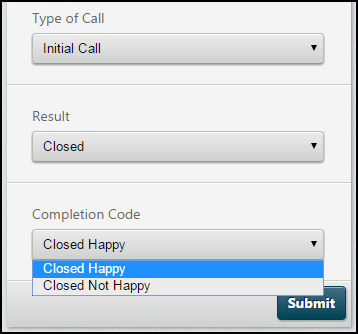
Note: multi-select completion code forms can also be configured, but it is advised that they do not be used for OUTBOUND campaigns.
Sentiments can be configured to provide a method for agents to assign a rating to the transaction they have just completed (for example - Positive, Neutral, Negative).
Each queue is assigned a completion code form. A default completion code form is defined at organisation level (using the setting in the Organisation Feature Configuration panel, displayed using the Organisations > Edit Organisations menu option), for use by queues that do not have a completion code form assigned to them.
At run-time, the agent uses the form that is assigned to the queue to provide a completion code. The completion code is used to populate the Last Result system-defined column.
Updating the Do-Not-Call Table
Completion codes can also be configured to add a number to your organisation's do-not-call table, as described in the Excluding numbers from contact lists section.